
Download Globus VPN Browser – Free Secure Browsing, Unblock Content, Privacy Protection for Windows, Mac, Android & iOS
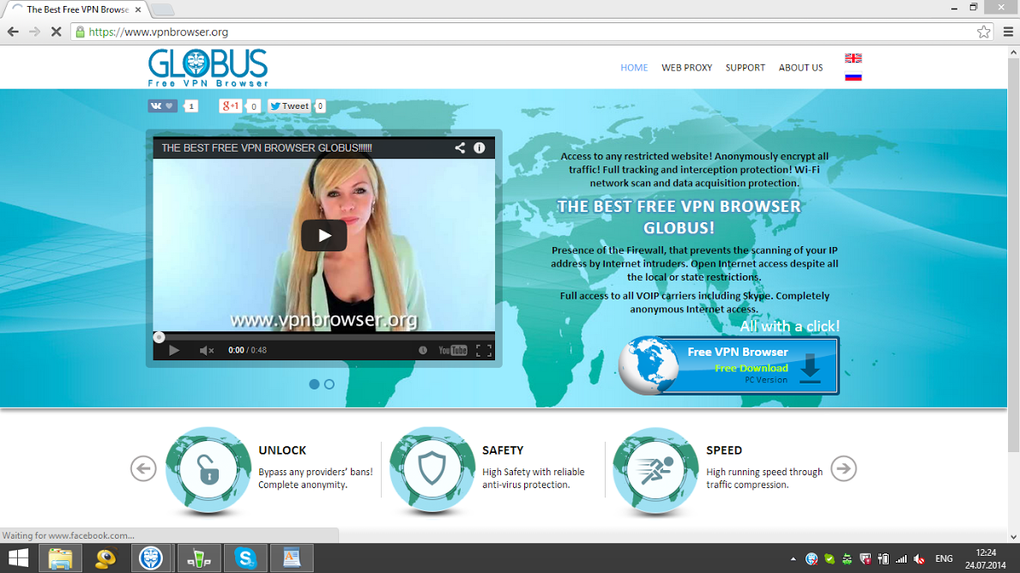
In today’s digital world, online privacy and unrestricted access to global content are more important than ever. Globus VPN Browser emerges as a powerful, free solution for users who want to browse securely, bypass geo-restrictions, and maintain anonymity across devices. Whether you're streaming international shows, accessing blocked websites, or simply want to shield your data from prying eyes, Globus VPN Browser delivers a seamless experience without compromising on performance or security. Designed with both beginners and privacy-conscious users in mind, this tool simplifies the process of connecting through secure servers worldwide. With just a few clicks, you can unlock content that’s otherwise unavailable in your region and protect your digital footprint. Unlike many free VPNs that come with hidden costs or data logging, Globus VPN Browser emphasizes transparency and user safety. Its intuitive interface ensures that even non-tech-savvy users can navigate settings effortlessly. The browser integrates directly with your online activities, encrypting traffic and masking your real IP address to keep your identity hidden. Whether you're using a Windows PC, Mac, Android phone, or iOS device, Globus VPN Browser supports all major platforms, making it a versatile choice for modern internet users. By combining speed, security, and ease of use, it stands out as one of the most reliable free tools in the current market.
Key Features of Globus VPN Browser
What sets Globus VPN Browser apart from other free browsing tools is its combination of powerful features designed to enhance both accessibility and privacy. First and foremost, the software enables geo-block bypassing, allowing users to access region-restricted content such as Netflix libraries from other countries, sports streams, news sites, and educational platforms. This is particularly useful for travelers, expatriates, or anyone looking to explore global internet content without limitations.
Another standout feature is automatic IP masking. When you activate the browser, your real IP address is replaced with one from a secure server, making it nearly impossible for websites, advertisers, or third parties to track your physical location or online behavior. This level of anonymity is crucial in an era where data harvesting and surveillance are widespread.
Globus VPN Browser also includes end-to-end encryption for all data traffic. This means that your personal information, login credentials, and browsing history are protected from hackers, especially when using public Wi-Fi networks. Whether you're checking your bank account at a café or sending sensitive emails, your connection remains secure.
Additionally, the browser is lightweight and fast, ensuring minimal impact on your device’s performance. Unlike some heavy VPN clients that slow down your internet speed, Globus maintains a responsive browsing experience. The one-click connect feature makes it incredibly easy to switch between servers with no technical setup required.
Finally, the software is completely free to use with no hidden subscriptions or data caps. While premium versions may offer more servers or advanced features in the future, the current free version provides everything most users need for daily browsing, streaming, and privacy protection.
- Unblock geo-restricted websites and streaming platforms
- Mask your real IP address for anonymous browsing
- End-to-end encryption for secure data transmission
- One-click connection with no technical setup
- Lightweight design for fast performance
- Free to download and use with no hidden costs
How to Install and Use Globus VPN Browser
Getting started with Globus VPN Browser is straightforward and takes less than five minutes. The first step is to download the software from the official website. Ensure you're using a trusted source to avoid malware or fake versions. Once downloaded, locate the installer file and run it. On Windows, this will launch an installer wizard; on Mac, you’ll need to drag the app into your Applications folder. For Android and iOS users, simply search for "Globus VPN Browser" in the Google Play Store or Apple App Store and install the official app.
After installation, launch the application. You’ll be greeted with a clean, minimalist interface that displays available server locations. Click the “Connect” button to instantly establish a secure connection. The browser will automatically route your traffic through the selected server, and you’ll see a confirmation message indicating that your IP has been changed.
Once connected, you can browse the web as usual. The browser integrates directly with your online activities, so you don’t need to switch between apps or configure complex settings. If you want to switch servers, simply select a different country from the list and reconnect. For added convenience, the app remembers your preferred server location for future use.
When you’re done browsing, click the “Disconnect” button to restore your original IP address and return to normal browsing. The entire process is seamless and designed to be as intuitive as possible. No account creation is required, which adds to the privacy benefits.
For users who want to optimize their experience, Globus VPN Browser supports automatic connection on startup, so your privacy is always active. You can also enable the kill switch feature, which blocks internet access if the VPN connection drops—ensuring your real IP is never exposed.
Compatibility and System Requirements
Globus VPN Browser is built to work across a wide range of devices and operating systems, making it one of the most accessible tools in its category. Whether you’re using a desktop, laptop, smartphone, or tablet, you’ll find a version tailored to your platform.
On Windows, the software supports Windows 7 and later, including Windows 10 and Windows 11. It runs smoothly on both 32-bit and 64-bit systems, requiring minimal system resources. For Mac users, Globus VPN Browser is compatible with macOS Mojave (10.14) and later, ensuring support for the latest Apple hardware and software updates.
For mobile users, the app is available on Android devices running Android 6.0 (Marshmallow) and above. It’s optimized for both smartphones and tablets, offering a responsive interface that adapts to different screen sizes. On iOS, the app is compatible with iPhone and iPad models running iOS 12 or higher, providing a consistent experience across Apple devices.
One of the biggest advantages of Globus VPN Browser is its lack of heavy system requirements. It doesn’t require advanced hardware or significant RAM, making it ideal for older devices or budget laptops. The app is also designed to use minimal battery on mobile devices, so you can enjoy secure browsing without draining your phone’s power.
Additionally, the software is regularly updated to improve performance, fix bugs, and enhance security protocols. Updates are delivered automatically, ensuring you always have the latest version with the most up-to-date encryption standards and server networks.
- Windows 7 and later (32-bit & 64-bit)
- macOS Mojave (10.14) and above
- Android 6.0 and higher
- iOS 12 and above
- Regular automatic updates for security and performance
Pros and Cons of Globus VPN Browser
Like any software, Globus VPN Browser has its strengths and limitations. Here’s a balanced look at what users can expect.
Pros
- Completely free with no hidden fees or data caps
- Easy to use – one-click connection with no technical knowledge required
- Strong privacy protection – IP masking and end-to-end encryption
- Supports multiple platforms – Windows, Mac, Android, iOS
- Lightweight and fast – minimal impact on device performance
- Automatic updates – ensures ongoing security and stability
- No account needed – enhances privacy from the start
Cons
- Limited server locations – fewer options compared to paid VPNs
- No dedicated customer support – help is limited to FAQs and community forums
- May slow down speeds slightly – especially on distant servers
- Not ideal for torrenting – due to no dedicated P2P support
- Free version only – no premium tier currently available
Frequently Asked Questions (FAQ)
Conclusion: Is Globus VPN Browser Worth Downloading?
If you're looking for a reliable, free tool to enhance your online privacy, bypass geo-blocks, and browse securely across devices, Globus VPN Browser is an excellent choice. Its combination of strong encryption, IP masking, and user-friendly design makes it ideal for casual users and privacy advocates alike. While it may not offer the same number of server locations as premium services, its performance, speed, and lack of cost make it a standout option in the free VPN space.
Whether you're on Windows, Mac, Android, or iOS, the software delivers consistent results without draining your device’s resources. The fact that it requires no account creation and has no data logging policies adds an extra layer of trust. For those who want a simple, secure, and free browsing experience, Globus VPN Browser is a must-download.
Download Globus VPN Browser today and take control of your online privacy and access—no strings attached.







